Privacy vs Anonymity vs Security
Decoding the Trio: Privacy, Anonymity, and Security Explained.

Watch Dogs 2 - ctOS Introduction Scene
The video above is from Watch Dogs 2, a video game depicting a dystopian future where everyday devices are interconnected to a network known as ctOS. It highlights themes of surveillance, vulnerability of city infrastructure to cyber threats, and the interconnectedness of IoT devices, which serve as data collection points mapping and recording daily routines. The video also alludes to the creation of digital profiles that can be bought, sold, or stolen in an instant, emphasizing the invasive nature of modern technology and the commodification of personal data.
In today's interconnected world, the concepts of privacy, anonymity, and security have become increasingly crucial. Each term represents a distinct aspect of safeguarding personal information and ensuring safety, both in the digital realm and the physical world. However, understanding the differences between them and recognizing their importance is essential for navigating the complexities of modern life.
Why Should You Care?
In recent years, the terms privacy, security, and anonymity have been heavily marketed by websites, apps, and companies, leading to confusion among users who may not fully understand the nuances between these concepts. It's crucial to grasp these key differences when assessing claims made by companies, enabling us to make informed decisions about our digital privacy and security needs.
The common saying, “If you have nothing to hide, you have nothing to be afraid of,” oversimplifies the complexity of privacy and security in the digital age. It overlooks the potential risks of abuse and assumes a level of comfort with constant monitoring. However, sensitive data can be weaponized against individuals, leading to phishing attacks, identity theft, and various cyber threats. This exploitation of personal information has been a concern throughout history and continues to pose significant risks in the digital realm.
Cyber Threats Explained
Cyber threats targeting privacy and anonymity encompass a range of malicious activities aimed at compromising individuals' personal data and online identities. Here are some common types:
- Phishing: Phishing involves fraudulent attempts to obtain sensitive information, such as usernames, passwords, and credit card details, by disguising as a trustworthy entity in electronic communication. Phishing emails often contain malicious links or attachments that, when clicked, can lead to data breaches or identity theft.
- Malware: Malware, short for malicious software, refers to software designed to infiltrate or damage computer systems without the users' consent. Examples include viruses, worms, Trojans, spyware, and ransomware. Malware can steal sensitive information, hijack devices for botnet operations, or encrypt files for ransom.
- Data Breaches: Data breaches occur when unauthorized individuals gain access to confidential information stored in databases or systems. This information can include personal data, financial records, or intellectual property. Data breaches can result from cyberattacks, insider threats, or security vulnerabilities.
- Identity Theft: Identity theft involves the unauthorized use of someone else's personal information to commit fraud or other criminal activities. Cybercriminals may steal individuals' identities through data breaches, phishing scams, or social engineering techniques, leading to financial losses and reputational damage.
- Online Tracking: Online tracking refers to the collection of users' browsing activities and preferences across websites and online platforms for targeted advertising, analytics, or surveillance purposes. Tracking technologies such as cookies, web beacons, and device fingerprinting can compromise users' privacy by creating detailed profiles of their online behavior.
- Man-in-the-Middle (MitM) Attacks: MitM attacks involve intercepting and eavesdropping on communication between two parties without their knowledge. Attackers may tamper with transmitted data or steal sensitive information exchanged between users and websites, compromising their privacy and security.
- Social Engineering: Social engineering techniques manipulate individuals into divulging confidential information or performing actions that compromise their security. Common tactics include pretexting, phishing, baiting, and tailgating, targeting users' trust and emotions to achieve malicious objectives.
- Doxing: Doxing involves researching and publicly disclosing individuals' personal information, such as addresses, phone numbers, and social media accounts, without their consent. Doxing can lead to privacy violations, harassment, or even physical threats against targeted individuals.
- Cyberstalking: Cyberstalking refers to the persistent monitoring or harassment of individuals online, often with the intent to intimidate, control, or harm them. Stalkers may use various online platforms and communication channels to track their victims' activities and invade their privacy.
- Government Surveillance: Government surveillance encompasses the monitoring and collection of citizens' online activities and communications by government agencies for law enforcement, intelligence gathering, or national security purposes. Mass surveillance programs can infringe on individuals' privacy rights and undermine democratic principles.
Privacy
Privacy encompasses the right to control access to our personal information, ensuring its confidentiality and protection from unauthorized disclosure. It's akin to drawing curtains on a living room window or closing the bathroom door for privacy, even when we have “nothing to hide.” This control extends to both physical and digital spaces, where maintaining confidentiality is vital.
Key Points
- Control over personal information access.
- Protection against unauthorized disclosure.
- Harder to achieve and maintain than anonymity.
- Ensures confidentiality in online interactions.
- Upholds control over personal space and information.
- Examples include using encryption for secure emails or drawing curtains for physical privacy.
In today's world, privacy is essential. Tools such as VPNs, ad blockers, and private search engines serve as vital safeguards against intrusive tracking by advertisers, trackers, and governmental surveillance. VPNs encrypt internet connections, making tracking challenging, while ad blockers and private search engines thwart data collection and personalized ads. These tools guarantee a secure and private online experience, safeguarding personal information from unauthorized access and exploitation.
Anonymity
Anonymity surpasses privacy by concealing one's identity completely. Unlike privacy, which concerns online presence, anonymity hides specific actions, protecting personal details such as name, location, or contact information. It enables individuals to interact and communicate without revealing personal information, offering protection against surveillance and harassment.
Using pseudonyms or anonymous browsing tools illustrates anonymity, allowing internet navigation without leaving a digital footprint. While anonymity provides freedom and protection, it also poses challenges, including potential misuse. Nonetheless, maintaining anonymity is crucial for safety or expressing dissenting opinions without fear of reprisal.
Degrees of Privacy and Anonymity
- Public social media profiles lack privacy and anonymity.
- Making select information private enhances privacy, but not anonymity.
- Altering identifiable details achieves anonymity, but not privacy.
- Deleting social media profiles ensures both privacy and anonymity.
Key Points
- Conceals identity or personal details.
- Allows engagement without identification.
- Shields against repercussions.
- Severs connections between online persona and real-world identity.
- Examples include using pseudonyms online and browsing anonymously with tools like Tor.
In addition to providing protection from surveillance and harassment, anonymity is vital for whistleblowers and activists like Edward Snowden, who rely on tools like Tor to safely communicate and share sensitive information. Maintaining anonymity allows individuals to exercise free speech and challenge authority without fear of retribution or persecution.
Clarifying Overlap
Privacy Can Encompass Anonymity
- Example: Using a privacy-focused messaging app with end-to-end encryption allows users to communicate anonymously without revealing their identities or the content of their messages to third parties. In this scenario, anonymity is a subset of privacy, as it ensures confidentiality and security in communication.
Anonymity Doesn't Ensure Privacy
- Example: Participating in anonymous online forums or social media platforms may protect users' identities from public disclosure. However, if the platform collects and shares users' personal data or browsing habits with third-party advertisers or data brokers, individuals' privacy may still be compromised despite their anonymity.
Privacy Doesn't Guarantee Anonymity
- Example: Sharing personal photos or information with a limited group of friends on a social media platform with strict privacy settings may protect individuals' privacy within that closed network. However, if a data breach occurs, exposing users' personal data to unauthorized parties, their anonymity may be compromised, even though their privacy settings were intact.
Overlap and Benefits of Combined Privacy and Anonymity
- Example: Using privacy-enhancing tools like virtual private networks (VPNs) or encrypted messaging apps can offer a combination of privacy and anonymity. For instance, a whistleblower leaking sensitive information to journalists may use encryption to protect the confidentiality of their communication (privacy) while also concealing their identity to avoid retaliation (anonymity).
Downsides of Overlapping Terms
- Example: In some cases, individuals may prioritize anonymity over privacy, leading to unintended consequences. For example, anonymous online trolls may exploit their anonymity to engage in cyberbullying or harassment, disregarding the privacy and well-being of their targets.
Security
Security encompasses measures taken to protect individuals, assets, and information from threats, both digital and physical. In the digital realm, security involves safeguarding data, networks, and systems from unauthorized access, cyberattacks, and data breaches. This includes practices such as using strong passwords, encryption, and multifactor authentication to secure online accounts and communications.
On the physical front, security measures may include installing locks, alarms, and surveillance systems to protect property and personal safety. While privacy and anonymity contribute to overall security, they represent different aspects of protection. Privacy focuses on controlling personal information, while anonymity shields one's identity from public exposure. Understanding these distinctions is crucial for developing effective security strategies tailored to individual needs and threat levels.
Threat Modeling
A threat model is a structured approach to assessing potential risks and vulnerabilities to personal security. It involves identifying potential threats, evaluating their likelihood and impact, and implementing measures to mitigate risks effectively. By conducting a threat model, individuals can identify their most significant areas of vulnerability and prioritize security measures accordingly. This could include assessing risks to online privacy, physical safety, or personal information security. By understanding potential threats and taking proactive steps to address them, individuals can better protect themselves from harm and maintain control over their digital and physical security.
Tools, Software, and Services
Here, we'll delve into common tools, software, and services used to maintain privacy or anonymity online. It's crucial to understand these tools thoroughly to avoid the risk of information leaks or inadvertently revealing metadata that could lead back to your identity. Always consult the documentation when learning to use or deploy software or tools. If you're uncertain, seek assistance from online communities.
Tor
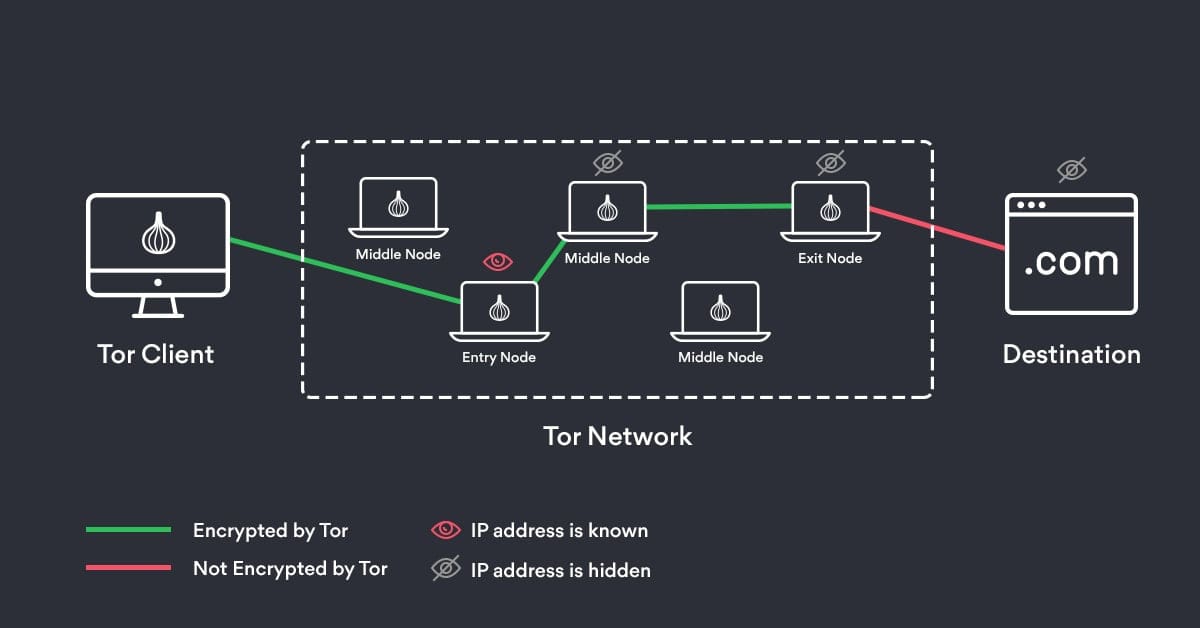
Tor, short for “The Onion Router,” is a privacy-focused network that routes internet traffic through a series of encrypted nodes, making it difficult to trace the origin or destination of the data. By bouncing your connection through multiple relays, Tor obscures your IP address and encrypts your traffic, enhancing anonymity. While Tor is often associated with criminal activity, it's also used by individuals in oppressive regimes to access unrestricted information and evade government censorship.
VPNs
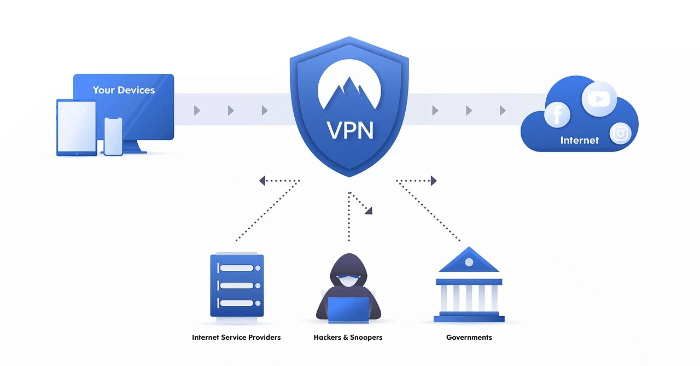
Virtual Private Networks (VPNs) encrypt your internet traffic and route it through servers located in different geographic locations, masking your IP address and enhancing privacy. However, it's essential to research the Terms of Service (TOS) and the reputation of VPN providers, as some may log user data or have questionable privacy practices. Free VPNs, in particular, often lack robust security measures and may sell user data to third parties. Additionally, VPNs present a single point of failure, and when used in conjunction with Tor, can potentially lead to security vulnerabilities. It's crucial to thoroughly understand the usage of Tor and VPNs to mitigate such risks.
Proxies
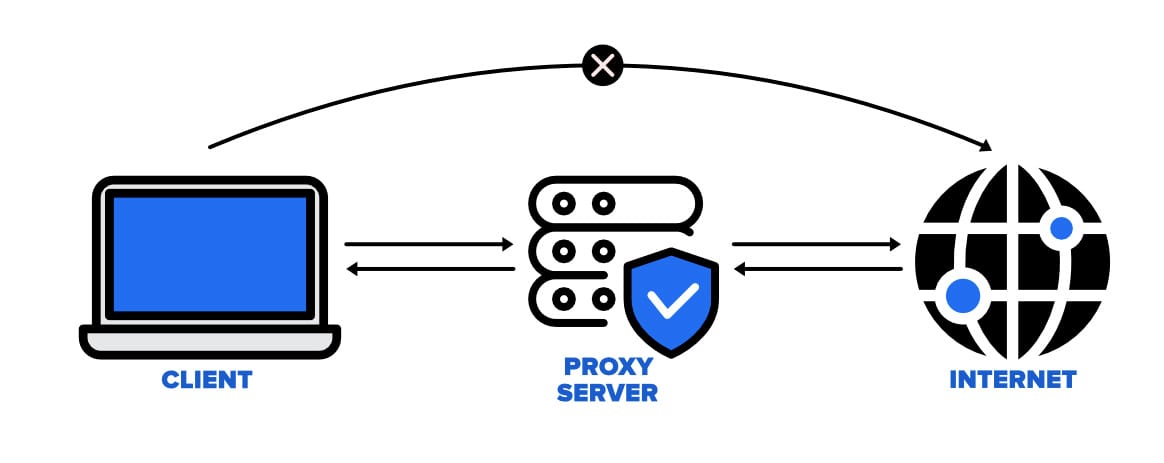
Proxies serve as intermediaries between your device and the internet, allowing you to route your traffic through a different IP address. While proxies can offer anonymity by hiding your IP address, they may not provide the same level of encryption and security as VPNs. Additionally, proxies are commonly used to bypass geo-restrictions or access content blocked in certain regions. However, it's important to note that proxies alone may not guarantee complete anonymity or privacy, as they may still reveal identifying information if misconfigured or compromised.
Private Email
“Private and secure” email services often tout buzzwords like “end-to-end encryption” or “offshore hosting,” promising to provide secure communication channels. However, the reality is that email inherently lacks privacy. For instance, if the recipient is using a service like Gmail, notorious for data harvesting and poor privacy practices, any encryption or security measures in place become ineffective. Why? Because the email provider can access the contents of your mailbox.
In essence, if you send an email from a privacy-focused provider with encryption to a service known for either complying with law enforcement requests or having subpar privacy practices, your efforts to secure your communication may be in vain. Therefore, it's crucial to utilize technologies like PGP (Pretty Good Privacy) when transmitting sensitive information via email. Even if an email provider gains access to your inbox, they won't be able to decipher the private contents of your messages.
Private Browsers
Choosing the right browser for maintaining privacy and anonymity online is paramount, as the browser serves as the gateway to the internet. Unfortunately, popular options like Google Chrome may not prioritize user privacy. For example, Google recently announced Manifest V3, the latest set of changes to Chrome's extension rules. This update will affect many extensions that rely on the soon-to-be-deprecated API, rendering ad blockers and similar tools useless. Moreover, Google is becoming more selective about which ad blockers it allows, further compromising user privacy.
In contrast, browsers like Brave, Librewolf, and Tor offer compelling alternatives for privacy-conscious users. These browsers often come with built-in privacy-oriented search engines and ad blockers by default. However, each browser has its strengths and weaknesses.
- Brave: Known for its privacy-focused features, Brave blocks trackers and ads by default, providing a streamlined browsing experience without compromising on privacy.
- Librewolf: Powered by the Firefox engine, Librewolf offers numerous anti-fingerprinting and privacy features. However, some websites and functionalities may break due to its stringent privacy settings.
- Tor Browser: While Tor offers high levels of privacy, it operates on the Tor network, which is notorious for its slow speeds and limited support for video streaming. Despite these drawbacks, Tor remains a popular choice for users seeking anonymity online.
Before selecting a browser, it's essential to research and consider your specific needs and preferences. While some browsers prioritize privacy and security, others may offer better performance or compatibility with certain websites and applications. Ultimately, choosing the right browser can significantly impact your online privacy and security.
Encrypted Password and File Storage
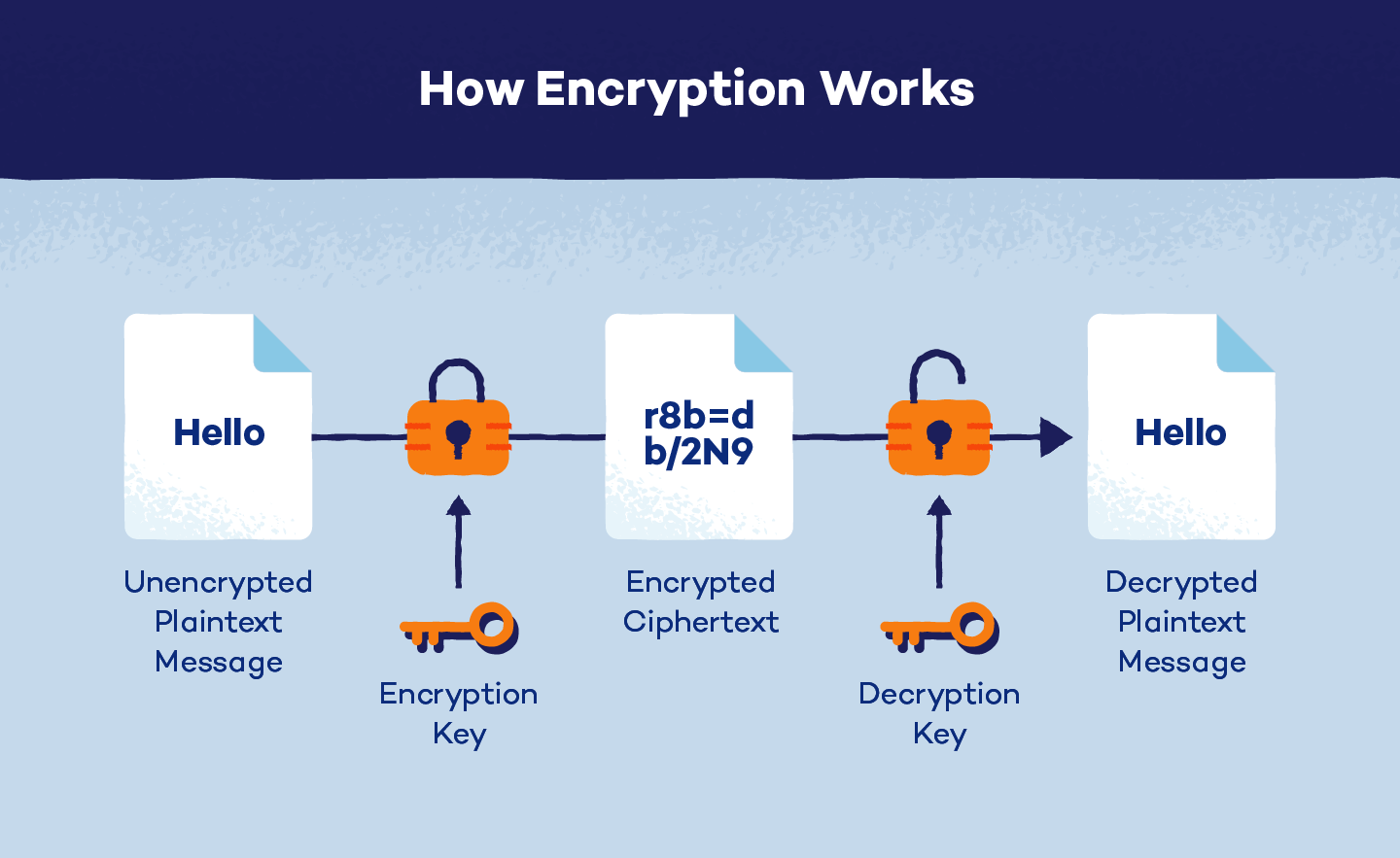
Ensuring the security of sensitive information, whether it's family photos, tax documents, or passwords, is crucial when storing them on any media, physical or digital. Relying solely on a simple pin or password to protect personal information can leave it vulnerable to phishing cyberattacks.
Many cyberattacks occur due to poor security practices, such as using short passwords or failing to encrypt data. Encryption plays a vital role in safeguarding data by converting it into indecipherable gibberish to unauthorized users. However, encryption alone is not enough; choosing the right software to manage passwords and encrypt files or folders is equally important.
I prefer using open-source software like Veracrypt and KeepassXC for managing passwords and encrypting files. These tools offer robust encryption algorithms and provide users with complete control over their data security.
- Veracrypt: Veracrypt is a powerful encryption tool that allows users to create encrypted volumes or encrypt entire drives. It offers a wide range of encryption algorithms and features, making it suitable for securing various types of data.
- KeepassXC: KeepassXC is an offline password manager that stores password vaults as encrypted files. This approach ensures complete control over passwords and eliminates the risk of a third-party service compromising security. While cloud-based password managers like OnePass offer convenience and cross-device syncing, they also pose a risk if the service experiences a security breach.
Ultimately, choosing the right software for encrypted password and file storage depends on individual preferences and security needs. Whether opting for open-source solutions like Veracrypt and KeepassXC or cloud-based alternatives, prioritizing data security is essential to protect sensitive information from unauthorized access and cyber threats.
Data Removal
Every time you upload a photo to a social platform, you're not just sharing the image itself; you're also sharing metadata embedded within the file. This metadata contains details like the date, time, location, resolution, and even the model of the device used to capture the photo. While seemingly innocuous, this metadata can reveal a lot about your habits and routines to determined individuals who know how to analyze it. Even when you delete a file, the data isn't truly gone. Instead, it remains embedded in your hard drive or solid-state drive, ready to be recovered by anyone with the right tools and knowledge.
Why does data persist even when deleted? Data is stored on drives as a series of ones and zeros, known as binary code. When you delete a file, the operating system simply marks the space occupied by that data as available for reuse. However, until new data is written over it, the original data remains intact and recoverable. This is where recovery software comes into play, reconstructing the ones and zeros to retrieve deleted files.
To ensure that deleted data is truly irrecoverable and to sanitize files by removing embedded metadata, you can use various tools and software:
- BleachBit: BleachBit is a free and open-source tool designed to securely delete files and clean system junk from your computer. It offers a simple interface and supports various file deletion methods to ensure data is unrecoverable.
- DBan (Darik's Boot and Nuke): DBan is a powerful tool used for securely wiping entire hard drives or partitions. It operates by overwriting data with random patterns multiple times, making it virtually impossible to recover any deleted information.
- ExifCleaner: ExifCleaner is a specialized tool for removing metadata from image files. It scans images for embedded metadata and allows you to selectively remove or sanitize this information before sharing or publishing the images online.
By utilizing these tools, you can not only securely erase sensitive data but also prevent the inadvertent disclosure of personal information through embedded metadata. Remember to use them responsibly and follow proper data sanitization practices to protect your privacy and security.
Cryptocurrency
Cryptocurrencies, such as Bitcoin, Ethereum, and Litecoin, are digital currencies secured by cryptography and decentralized networks. They utilize blockchain technology, a distributed ledger system, to record transactions across a network of computers. Each transaction is verified by network nodes and added to a block, forming an immutable chain.
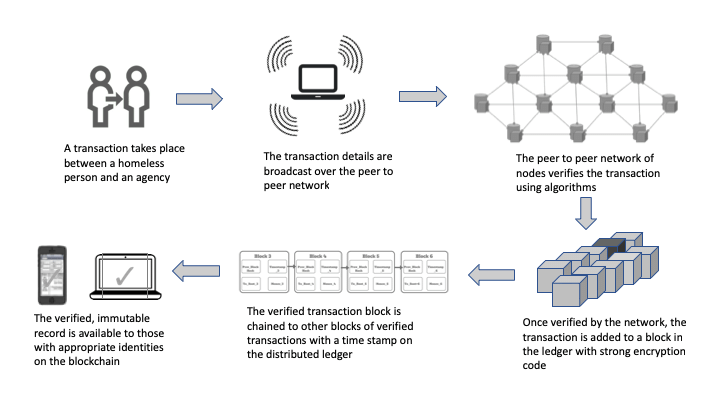
While cryptocurrencies offer some degree of pseudonymity, transactions are publicly recorded on the blockchain and can be traced back to their origins. Many exchanges and wallet providers require users to undergo Know Your Customer (KYC) verification, linking transactions to their identities.
Newer cryptocurrencies like Monero focus on privacy and anonymity by employing advanced cryptographic techniques such as ring signatures and stealth addresses. This makes it extremely challenging to trace transactions back to their source.
Despite the innovative features of cryptocurrencies, they do not guarantee complete privacy or anonymity. Users should be aware of the traceability of transactions and consider using privacy-focused cryptocurrencies like Monero or employing additional privacy-enhancing tools and techniques.
Free Open Source Software (FOSS)
Free and Open-Source Software (FOSS) offers significant security and privacy benefits due to its transparent nature. Users can inspect the source code to verify its integrity, ensuring that there are no hidden vulnerabilities or backdoors. Additionally, the collaborative nature of FOSS development often leads to faster identification and patching of security issues.
One of the primary advantages of FOSS is its cost-effectiveness. As the name suggests, FOSS is free to use, modify, and distribute, making it accessible to individuals and organizations of all sizes. Furthermore, FOSS is typically compatible with multiple operating systems, including macOS, Windows, and Linux, offering flexibility and interoperability.
Popular FOSS applications include:
- LibreOffice: A free and open-source office suite, providing tools for word processing, spreadsheets, presentations, and more.
- VeraCrypt: A cross-platform disk encryption software that allows users to encrypt files, partitions, and entire drives for enhanced security.
- LibreWolf: A privacy-focused web browser based on Mozilla Firefox, offering enhanced privacy features and protection against online tracking.
- KeePassXC: A free and open-source password manager that securely stores and manages passwords, ensuring strong authentication and data protection.
Despite its many benefits, FOSS may have some downsides. For example, the lack of dedicated customer support or service-level agreements (SLAs) can be a concern for organizations requiring timely assistance. Additionally, the perceived complexity of some FOSS solutions may deter less technically inclined users. However, with proper training and support, FOSS can offer robust security and privacy features without the high costs associated with proprietary software.
Privacy Focused Operating Systems
Privacy-focused operating systems are designed to prioritize user privacy and security by implementing various built-in features and safeguards. These operating systems offer enhanced privacy protections compared to mainstream platforms like Windows or macOS. Here are some examples:
- Tails: Tails is a live operating system that can be booted from a USB stick or DVD. It aims to preserve privacy and anonymity by directing all internet traffic through the Tor network, encrypting files and communications, and leaving no trace of activity on the host system. Tails is often used by journalists, activists, and whistleblowers who require secure and anonymous communication.
- GrapheneOS: GrapheneOS is an open-source mobile operating system focused on security and privacy. It is based on the Android Open Source Project (AOSP) and includes features such as a hardened kernel, improved sandboxing, and verified boot. GrapheneOS prioritizes user privacy by minimizing data collection and preventing tracking by third-party apps and services. It is suitable for individuals who prioritize privacy on their mobile devices and want to minimize data exposure.
- Qubes OS: Qubes OS is a security-focused operating system that utilizes compartmentalization to isolate and protect different computing environments. It divides applications into separate virtual machines (VMs) called "qubes," each running its own operating system. Qubes OS enables users to create isolated environments for different tasks, such as web browsing, email, and banking, reducing the risk of compromise and unauthorized access. It is ideal for users who require strong isolation between their computing activities to prevent potential security breaches.
These privacy-focused operating systems offer users greater control over their digital privacy and security compared to traditional operating systems. They prioritize features such as encryption, anonymity, and compartmentalization to provide a more secure computing environment. While they may require a learning curve for new users, the enhanced privacy protections they offer make them invaluable tools for individuals seeking to protect their personal data and online activities.
Conclusion
Understanding the intricate relationship between privacy, anonymity, and security is crucial in today's digital landscape. Privacy ensures control over personal information, while anonymity offers protection against surveillance and unwanted attention. Security, spanning digital and physical realms, is essential for safeguarding against threats.
By leveraging tools like VPNs, encryption software, and privacy-focused browsers, individuals can proactively protect their digital identities. However, achieving these goals requires ongoing education and vigilance, as the landscape evolves. Embracing privacy-enhancing tools and adopting security best practices empower individuals to navigate the digital world with confidence and autonomy.
Useful Links
Attention: I'm not infallible regarding Privacy, Security, and Anonymity. Before making decisions, conduct thorough research and consult the manual (RTFM). Always verify links, downloads, etc. Stay vigilant and exercise due diligence.
Related Websites
- Electronic Frontier Foundation - The Electronic Frontier Foundation is the leading nonprofit organization defending civil liberties in the digital world. Founded in 1990, EFF champions user privacy, free expression, and innovation through impact litigation, policy analysis, grassroots activism, and technology development. EFF's mission is to ensure that technology supports freedom, justice, and innovation for all people of the world.
- Privacytests.org - PrivacyTests.org is an open-source initiative that subjects popular web browsers to a suite of automated tests. These tests are designed to audit web browsers' privacy properties in an unbiased manner. The results of the tests are made public to help users make an informed choice about which browser to use, and to encourage browser makers to fix leaks of private user data.
- Privacytools.io - You are being watched. Private and state-sponsored organizations are monitoring and recording your online activities. PrivacyTools.io provides services, tools and privacy guides to counter global mass surveillance. Established in 2015 after Edward Snowden's revelations, and is now the most popular privacy website.
- The Hitchhiker’s Guide to Online Anonymity - This is a maintained guide with the aim of providing an introduction to various online tracking techniques, online ID verification techniques, and detailed guidance to creating and maintaining (truly) anonymous online identities.
Private Email
- ProtonMail - ProtonMail is an encrypted email service based in Switzerland. It offers end-to-end encryption, meaning only the sender and recipient can read the emails. ProtonMail does not have access to user emails or encryption keys, enhancing privacy and security. It also provides features like self-destructing emails and two-factor authentication for added protection.
- Cock.li - Cock.li is an email provider known for its privacy-conscious stance and unconventional domain names. It offers email services with various domain options like cock.li, memeware.net, and 420blaze.it, among others. Despite its humorous or controversial domain choices, Cock.li prioritizes user privacy and security. It provides features like secure email storage, encryption, and protection against spam. Cock.li is favored by some users for its commitment to privacy and its unique approach to email hosting.
- RiseUp - Riseup is an organization that provides secure communication tools for activists, organizers, and individuals concerned about privacy. They offer services such as email, VPN (Virtual Private Network), and file storage. Riseup's email service is known for its focus on privacy and security, offering end-to-end encryption and protection against surveillance.
Private Browsers
- Tor Browser - Utilizes the Tor network to anonymize internet traffic by routing it through a series of encrypted nodes, enhancing privacy and anonymity.
- Brave - A privacy-focused browser built on Chromium, featuring built-in ad and tracker blockers, as well as HTTPS Everywhere for secure browsing.
- Librewolf - A fork of Firefox with privacy and security enhancements, including anti-fingerprinting measures and tracker blocking.
File Storage and Encryption
- VeraCrypt - Open-source disk encryption software that creates encrypted containers or encrypts entire disk partitions, providing strong security against unauthorized access.
- GnuPG & Gpg4win - An implementation of the OpenPGP standard for email encryption and digital signatures, enabling secure communication and data integrity verification.
- 7-Zip - A file archiver with strong encryption capabilities, allowing users to compress and encrypt files and folders for secure storage and transmission.
- KeepassXC - A cross-platform password manager that stores passwords and other sensitive data in an encrypted database, ensuring secure access to credentials.
Secure Data Removal and Sanitization
- Bleachbit - A disk cleaning tool that securely deletes temporary files, cache, and other unnecessary data to protect privacy and free up disk space.
- Dban - A disk wiping utility that securely erases data from hard drives by overwriting it multiple times with random patterns, preventing data recovery.
- ExifCleaner - A tool for removing metadata from image files to protect privacy and prevent sensitive information leakage.
FOSS Alternatives
- LibreOffice - LibreOffice is a free and open-source office suite that provides a range of productivity tools for word processing, spreadsheets, presentations, and more. Developed by The Document Foundation, LibreOffice is a cross-platform software available for Windows, macOS, and Linux, offering compatibility with various file formats including Microsoft Office formats like DOCX, XLSX, and PPTX.
- NextCloud - An open-source self-hosted cloud storage platform that allows users to store, sync, and share files securely, providing control over data privacy and security.
- OpenWrt - A Linux-based open-source firmware for routers and embedded devices, offering advanced networking features and security enhancements.
- Signal - An encrypted messaging app that provides secure communication with end-to-end encryption for messages, calls, and file transfers, ensuring privacy and data security.